Why Legacy Ad Management Plugins Are Secretly Slowing Down Your WordPress Site
A frank look at how old-generation WordPress ad plugins silently hammer your database on every page load — and why building AdVajra around a zero-query memory snapshot architecture was the only honest engineering decision.

I’ve spent a good amount of time auditing WordPress publisher sites. Sites with real traffic, real ad setups, and real revenue at stake. And almost every time I dig into a slow TTFB or an erratic server response spike, the culprit is not the theme. It is not the image CDN configuration. It is the ad plugin.
Most publishers never look there. The ad plugin is treated like plumbing — you activate it, configure your placements, and forget about it. But some plumbing leaks quietly for years before the ceiling falls in.
This is one of those slow leaks.
The Real Problem with Old-Generation Ad Plugins
Here is what nobody talks about directly: the dominant ad management plugins available on WordPress.org were architected during a fundamentally different era. We are talking 2012 to 2016 workflows. At that time, a WordPress site doing 5,000 visits a day was considered healthy traffic. Database query counts were rarely a concern at that scale. So developers wrote what worked — dynamic get_post_meta() calls, repeated on every page render, for every ad placement.
That philosophy became the default. It was copied, forked, and recycled across nearly every popular advanced ads alternative you have ever evaluated.
The core pattern looks like this: a visitor lands on your page. Your server wakes up and starts building the response. When it hits each ad placement — your header unit, your in-content unit, your sidebar block — it fires a fresh database query to look up that ad’s dimensions, targeting rules, status, display settings, tracking configuration, and content type. One query per field lookup. Three to eight meta calls per ad. Ten ad placements on a page means potentially eighty database operations happening before a single byte of HTML reaches the browser.
Every. Single. Page. Load.
The Hidden Server Strain Nobody Calculates
The cost of this architecture is not obvious when you are doing a thousand visits a day. But when you publish something that hits the front page of Reddit, or get picked up by a major newsletter, or run a successful social campaign — the math changes fast.
Imagine your hosting server processing 400 concurrent requests in a two-minute window. Each of those requests triggers that same cascade of meta lookups. Suddenly your database connection pool is saturated, your TTFB climbs from 200ms to 1.8 seconds, and your hosting provider starts sending you emails about resource overages. Your site slows precisely when it should be performing at its absolute best.
This is the hidden tax. You pay for it in elevated hosting bills, in performance bottlenecks under load, and in real user experience degradation that directly impacts your ad viewability and RPM. If you have been working on fixing main thread blockages from ad scripts, the database layer is a completely separate problem that lives upstream of everything you optimized at the browser level.
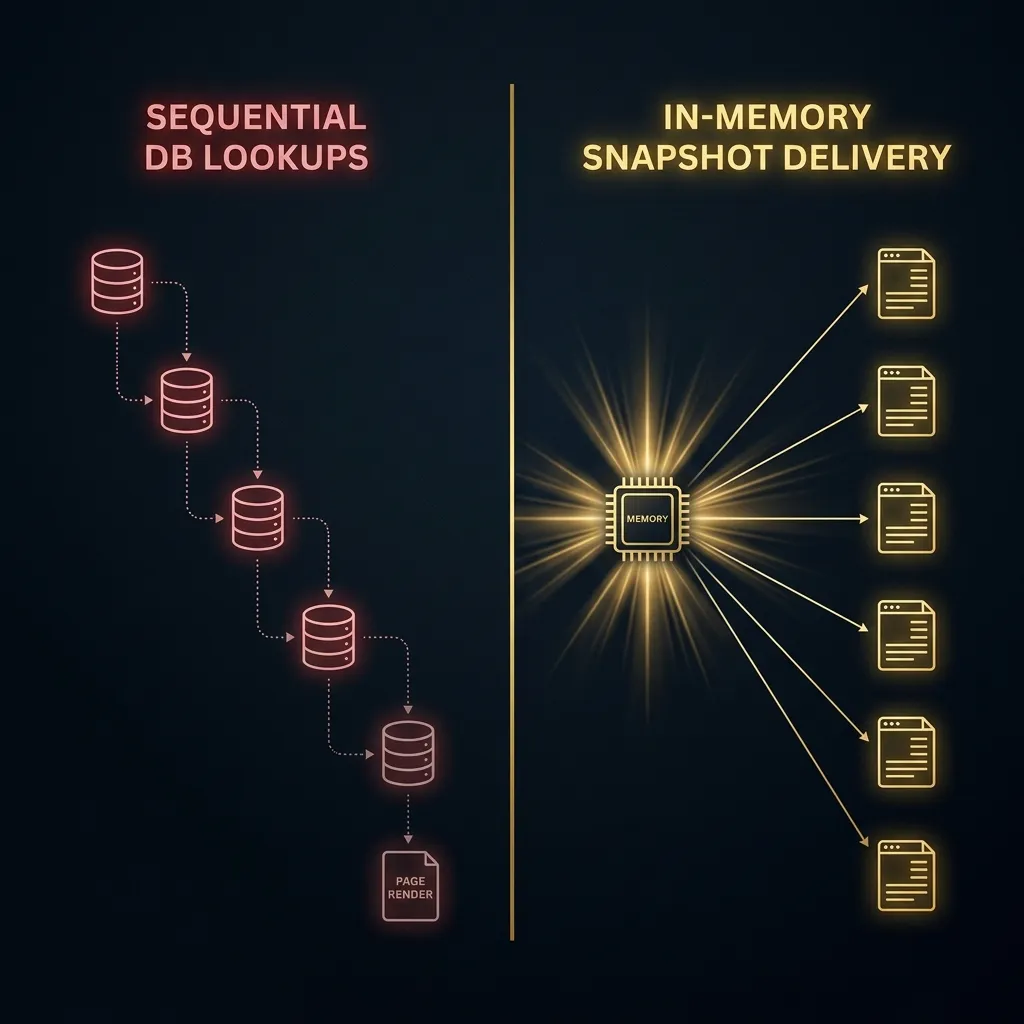
The diagram above is not abstract. This is the actual query pattern difference between an old-generation ad plugin and the approach I engineered into AdVajra. The left side is what your database server is handling right now if you are running a legacy tool.
Zero-Query Page Assembly: Why I Built AdVajra Differently
I did not want to build another ad plugin. I wanted to build the infrastructure that a serious WordPress publisher would actually trust under pressure.
The architectural decision was straightforward, even if the implementation took time to get right. Instead of dynamically querying the database every time a placement renders on the frontend, AdVajra loads your complete ad and placement configuration into a normalized, request-local memory snapshot the moment a page request begins.
Here is what that means in practice. When your page starts rendering and hits your first ad placement, the data is already in memory. Type, dimensions, tracking mode, targeting rules, link attributes, layout settings — everything is already resolved. The server processes ad containers instantly from that local snapshot without issuing any new database queries.
For a page with ten placements, the old approach issues potentially eighty or more database meta calls. AdVajra issues zero at render time. The configuration data was already primed and cached from a single efficient batch operation at request start.
I verified this by reading my own source code. In AdSnapshotRepository::get(), before anything else happens, the method checks a static in-memory cache array. If the snapshot is there, it returns immediately. No query. No overhead. If it is not there yet, it calls prime() which uses WordPress’s update_meta_cache() to batch-load all meta for every ad ID in a single database round-trip — then stores the result so every subsequent render on that same request costs nothing. You can read more about the specific database query architecture in my detailed technical write-up on the AdVajra delivery pipeline.
This is also why the plugin handles ad-induced layout instability differently than most tools. The snapshot approach means dimensions and reserved space information are always known before rendering begins — which is a prerequisite for proper CLS prevention.
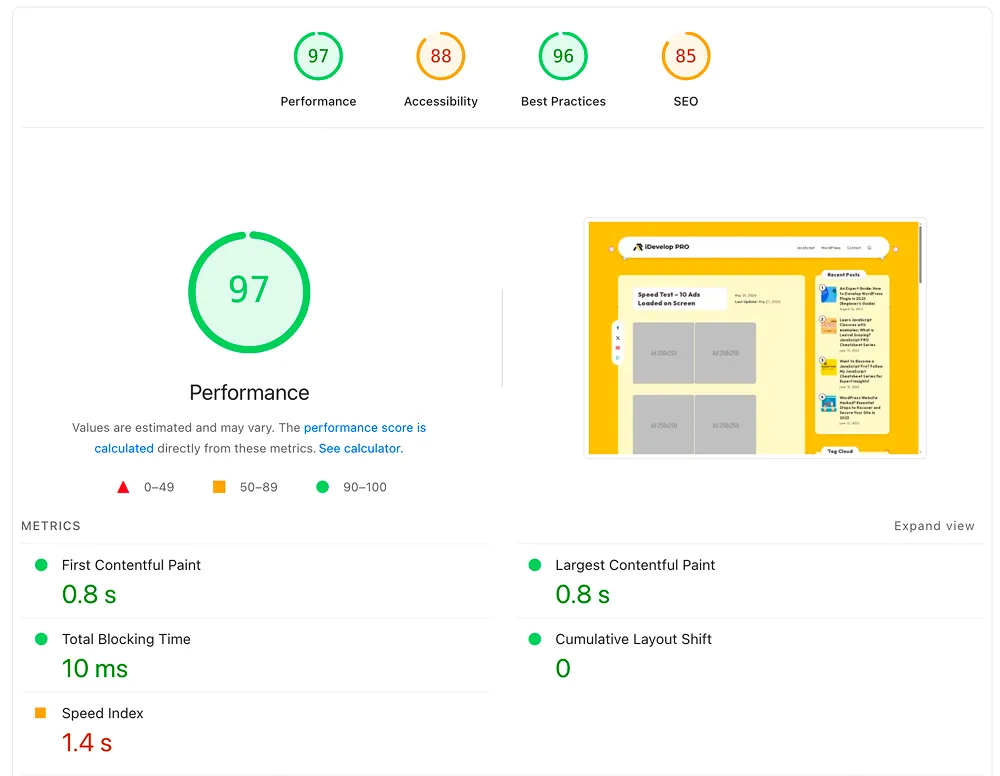
See the Architecture in Action
AdVajra PRO unlocks the Delivery Risk Queue, Click Fraud Protection, AdBlock Recovery, and more.
See PRO Plans →The Part Most Publishers Skip When Evaluating Plugins
When publishers compare ad management tools, they look at the feature list. Lazy loading, rotation, targeting, analytics. Fair enough — those things matter.
But almost nobody asks: what does this plugin do to my server under load?
That question is invisible on the feature comparison page. You will not find it in the plugin’s marketing copy. You find it at 2 AM when your site goes viral and your hosting dashboard starts lighting up red.
The best lazy load ad plugin for WordPress is not the one with the most UI options. It is the one that costs your server the least during the moments that matter most — high-traffic bursts, crawl events, programmatic auction cycles running in parallel with real visitor sessions.
I built AdVajra to be that plugin. Not because it was the flashiest path, but because it was the honest one.
Stop leaving ad revenue on the table.
Get the Delivery Risk Queue, Click Fraud Protection, AdBlock Recovery and more.